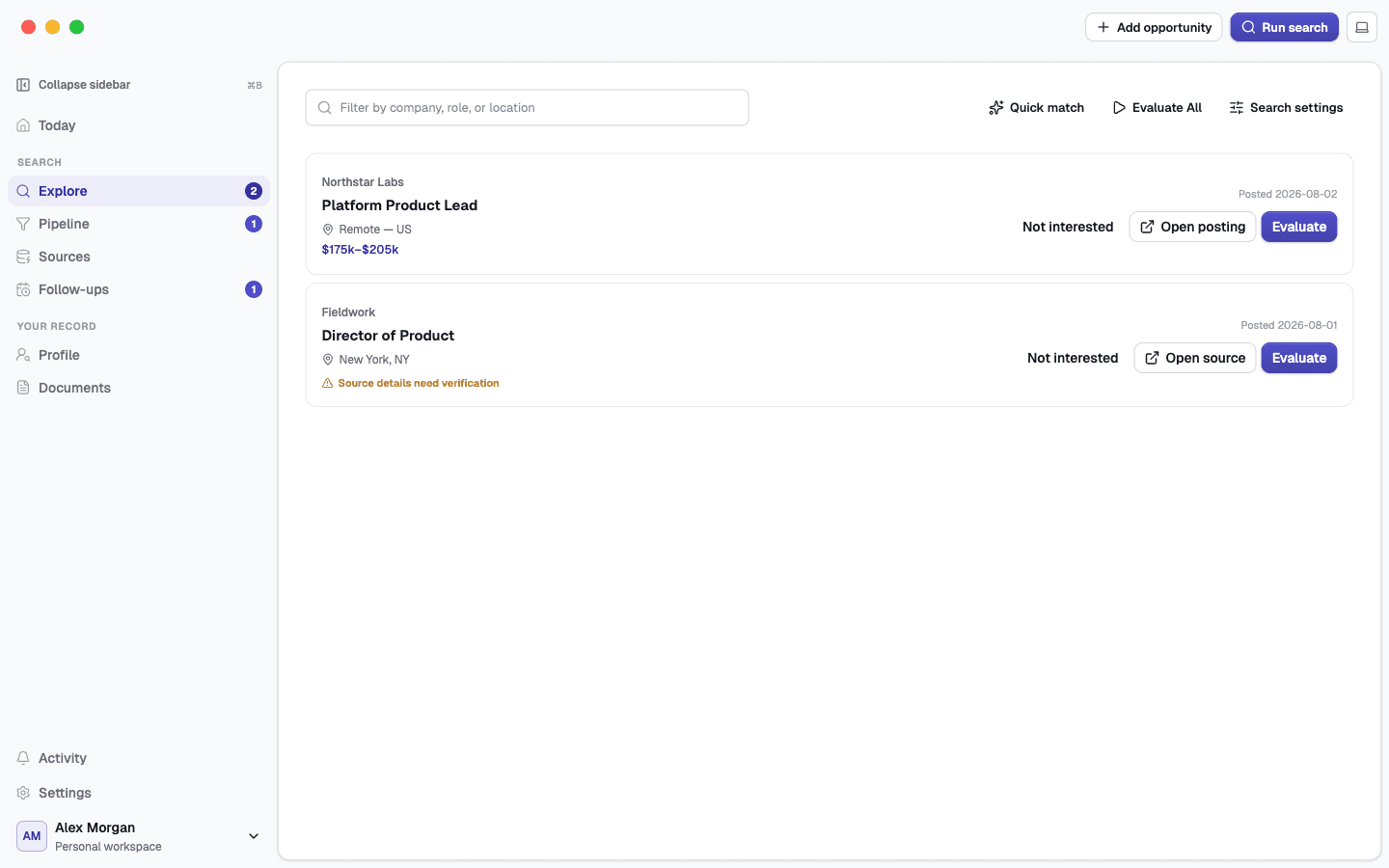
A job-search workspace for Mac

Your job search, finally connected.

Find roles, evaluate fit, prepare truthful applications, and track every next step without losing the evidence behind your decisions.

Jobber organizes the work. You review every result and make every final decision.
Jobber Explore showing two synthetic opportunities with quick match and evaluation controls
Explore, compare, and evaluate opportunities in one local workspace.

The useful context should not disappear between browser tabs, spreadsheets, and AI chats.

Each step adds to one inspectable record.

1Import

Turn trusted résumés and links into a record you can review.

2Find

Search configured sources and remove obvious mismatches early.

3Evaluate

Inspect fit, facts, links, and missing evidence before you commit time.

4Prepare

Create application materials from approved career evidence.

5Decide

Track the opportunity while you choose every submission and next move.

One continuous record
for your whole search.

Review what Jobber found, where it came from, and what changed—without losing the opportunity that produced it.

1

Import and approve your career record

Start with a résumé, then review structured experience, education, skills, projects, links, and preferences. Imported material is a proposal until you approve it.

  • Edit every field
  • Re-import later
  • Keep the source document
2

Search with a strategy, not a blank box

Set target roles, locations, remote and mobility needs, compensation, freshness, exclusions, and sources. Quick match gives you a first-pass shortlist without hiding the rest.

  • Source controls
  • Plain-language reasons
  • Durable not-interested state
3

Deep-evaluate the roles worth your time

Bring the posting, company context, location, pay, benefits, and your approved evidence together. Jobber shows support, gaps, confidence, and links behind the conclusion.

  • Grounded fit evidence
  • Recoverable source errors
  • No automatic applying
4

Prepare truthful, role-specific materials

Generate a résumé, cover letter, application answers, research, or interview prep from approved facts. Preview the result in Jobber, revise it, and keep each version with the opportunity.

  • Rendered document preview
  • Prompted revisions
  • Nothing sent automatically
5

Keep every next step attached

Move opportunities through your pipeline, schedule follow-ups, and review documents and activity without reconstructing the story from browser tabs and spreadsheets.

  • Drag and bulk actions
  • Application timeline
  • Portable local workspace
Career evidenceSearch strategyQuick matchDeep evaluationDocumentsPipelineFollow-upsActivity

Local, file-based workspace

Your career workspace
stays in your control.

Your primary career files and generated documents live in the workspace you select. Searches contact enabled sources, and an assisted task sends its workflow context to the helper you selected.

See how Jobber handles data
1

Local workspace

Your approved evidence, opportunity records, reports, and generated documents remain on your Mac.

Your Mac
2

Sources and selected helper

Searches contact sources you enable. The separately installed helper owns its login, account, and provider-side processing.

External services
3

No cloud copy of your career workspace

Your career record, opportunities, evaluations, and documents stay in the local workspace you control.

Local by default

Enough detail to act.
Enough evidence to trust it.

Fast matching reduces noise. Deliberate evaluation and truthful materials help you spend time where it matters.

01

Find less noise.

Search with a strategy, then inspect concise match reasons before you commit more time.

The full list remains available; you decide what leaves the queue.
02

Investigate what matters.

Bring posting facts, company context, links, contradictions, and career evidence into one view.

Every conclusion stays inspectable instead of disappearing into a chat.
03

Create from approved facts.

Preview résumés, cover letters, application answers, and revisions with the role that produced them.

Unsupported qualifications are excluded and nothing is submitted for you.
04

Keep the whole search moving.

Move applications, prepare follow-ups, and review the task timeline in the same record.

Bulk actions save time without taking away the final confirmation.

Choose how AI fits your workflow.

Bring eligible Codex access, connect your own OpenAI API project, or choose Jobber AI for a simple monthly allowance.

Your provider choice stays explicit

Jobber shows which provider is active, who bills for it, and what task context it can receive. It never silently switches providers.

Three ways to connect

Keep the setup—and the bill—under your control.

Compare who provides the AI, where charges appear, and which option best matches the way you work.

Use eligible Codex access

Use my Codex

Connect an eligible Codex account through OpenAI's sign-in flow and keep provider usage separate from Jobber billing.

Setup
Choose Codex, complete the official sign-in flow, then run a connection check.
Who pays
Usage is governed by your eligible OpenAI plan and its current terms.
Data path
The selected task context goes from Jobber on your Mac to OpenAI.
Best for
People who already use Codex and want to keep that provider relationship.
Compare all AI options

Buy the workspace once.
Add hosted AI only if you want it.

Jobber Desktop and Jobber AI are separate, so local workspace access never depends on a hosted-AI subscription.

Jobber Desktop

One-time license

  • Your licensed major version keeps working.
  • A defined period of updates and support.
  • Local workspace and bring-your-own-AI options.
  • Future major upgrades remain optional.
Buy Jobber

Jobber AI

Optional monthly subscription

  • A simple provider-free setup.
  • A hard monthly allowance with no automatic overage.
  • Separate from the desktop license.
Compare AI options

The desktop license and Jobber AI are billed separately. Checkout shows the full price, update period, device allowance, renewal terms, and refund policy before payment.

Clear answers before download.

Review compatibility, data handling, updates, source access, and provider choice in plain language.

Does Jobber apply for me?

No. Jobber helps you research, prepare, and track. You make the final decision and submit every application yourself.

Where are my career files stored?

Your career record, opportunities, evaluations, and generated documents live in a portable local workspace on your Mac. Account and hosted-AI services use only the minimum service data described in the privacy guide.

Which Macs are supported?

Jobber is designed for Apple silicon Macs. The download page lists the exact minimum macOS version for the current release.

Do I need Jobber AI?

No. Use eligible Codex access, connect your own OpenAI API key, or choose the optional Jobber AI subscription. The desktop license and Jobber AI are separate.

Can I change AI providers later?

Yes. Provider choice is explicit, and Jobber never silently falls back to a different provider when a task fails.

What happens when my update period ends?

Your licensed desktop version keeps working. A purchase includes a defined update and support period; future major upgrades are optional.

Can I move or export my workspace?

Yes. Your workspace is local and file-based, so your career record and generated documents remain portable.

How does Jobber handle job-source access?

Jobber uses reviewed public or authorized sources, preserves source links, and leaves restricted or uncertain listings for manual review. It does not bypass source access controls.

Your record. Your helper. Your decision.

Keep your search connected.
Keep the final decision yours.

See the full workflow, compare AI options, and learn how Jobber keeps the work attached to every opportunity.